Music from Text

There are a lot of games that have music-like vocalizations from characters in place of speech. I am exploring what could be possible using the MIDI system plus a handy script I found to create a Typewriter effect in the UI. In the end I had to write my own code to make it play nice with the MIDI library but the link above would work for most typical situations I think.

How it works?

As the typewriter is typing out the text, each time it starts a new word, it picks a random note from a provided range to start a chord from. Then it increases using a 4, 3, 5 semi-tone pattern to create the major chord, repeating this pattern if there are more than 3 letters in the word. When it finds a space, it picks a new random starting note.

What’s Next?

I would like to experiment with different instruments as well as different expressions such as volume and pitch bending to create emphasis and inflection in the generated vocalizations.

Making Music

So I started falling down a rabbit hole of VR music generation and so far I’ve been able to load in a MIDI library and link it up to the buttons I already have.

With some really janky hacks I just finished implementing a sensitivity system so you can hit the button softer or harder to have the note play louder or softer.

Next up is fixing the damn buttons because they are REALLY not great. I need a better button system that can detect harder/faster presses. Basically they need to make it better, do it faster, harder better faster stronger.

Broadcasting Messages

Did more coding work on my meditation stations and had to remind myself how to broadcasting messages. The reason for this is because part of the meditation station is actually attached to the player, allowing me to detect where the hands are positioned, where as the other is attached to the station, allowing me to make sure the player is standing in the right spot.

I hope to be able to show a video of the full effect soon.

Super Bounce Script

I found a handy script to increase bounciness beyond 1.0 which the author called a “Power Bounce” but we can call it a “Super Bounce”. It works really well.

using System.Collections;
using System.Collections.Generic;
using UnityEngine;

public class HeadButt : MonoBehaviour
{
    public float str = 0.21f;
    public AudioClip HeadButtAudio;

    // Start is called before the first frame update
    void Start(){}

    // Update is called once per frame
    void Update(){}

    void OnCollisionEnter(Collision col)
    {

        Debug.Log("Hit!");
        
        if (col.gameObject.tag == "buttable")
        {
            Rigidbody rb = col.gameObject.GetComponent<Rigidbody>();
            rb.AddForce(rb.velocity * str, ForceMode.Impulse);
        }

        SFXPlayer.Instance.PlaySFX(HeadButtAudio, transform.position, new SFXPlayer.PlayParameters()
        {
            Pitch = Random.Range(0.9f, 1.1f),
            SourceID = -1,
            Volume = 1.0f
        }, 0.0f);

    }
}

The only thing left to do at a later date would be to try to accelerometer values from the headset and link that to the str (strength) parameter in the script.

Fixing Physics and Headbutting stuff

Fixing the collision issues wasn’t too difficult. I just had to shuffle the layers around so that grabbable things don’t collide with the player.

thanks Unity Manual!

Next I implemented the basic mechanical buttons that are already built into the template I’m using. From a UX perspective I figured it would be feel better to have physical mechanical buttons rather than rely only on UI canvases. I’m also creating a cable that I want the player to be able to plug into their arm to activate the computer screen.

pressing the button turns the fan on

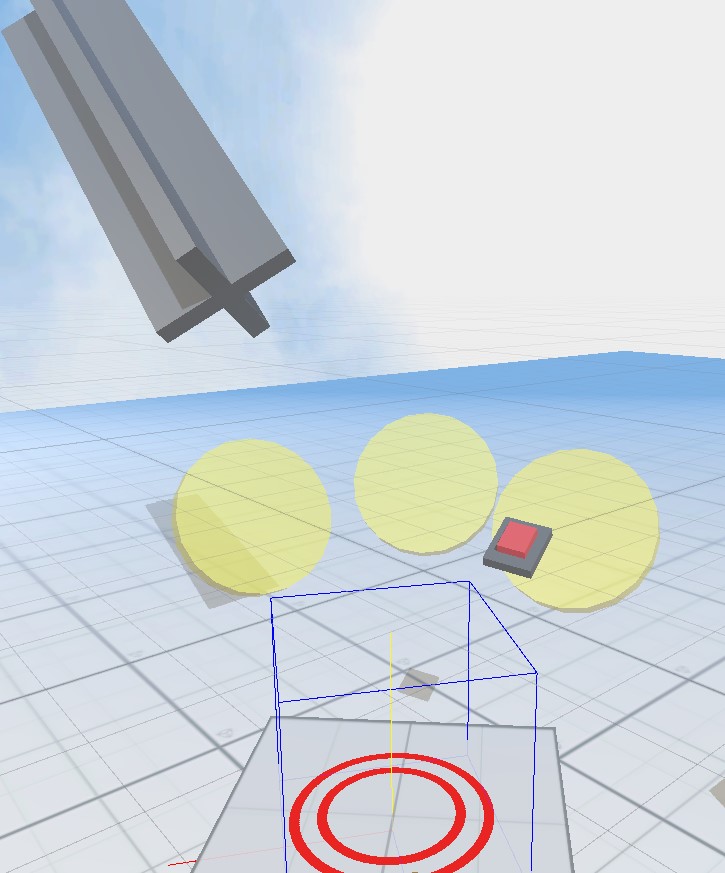
Lastly I got this idea of adding a collider to the head to allow for headbutting interaction. I built a little test zone to try it out.

the button dispenses a ball which you can try to knock through one of the 3 rings.

It works but I want the player to really be able to pop it up when they headbutt the ball but to do that I need to figure out a way to amplify the force that the player moves the Oculus headset with. Increasing the bounciness alone isn’t enough as the maximum is 1. Possibly something like the script here?

Elevator Works… Now everything else is broken.

I got the elevator working!

The following additional article was helpful for me: https://jackpritz.com/blog/unity-colliderrigidbody-setups-in-xr

Unfortunately, everything else doesn’t work because if I pick up an object it immediately starts colliding with me and I get launched into the air like I’m a team rocket villain at the end of a Pokemon episode.

I will need to deal with physics/collision layers.

I’m also working on some other curious interactive content. Stay tuned for that!

Elevating Yourself in VR

I had a dream the other night about riding in a hot air balloon and I thought that might actually be a really cool premise for a VR game! Although I have other plans for feature game content I thought it would be a fun experiment to play around with.

To start I want to experiment with the sensation of going up and down and have a way for the player to control it.

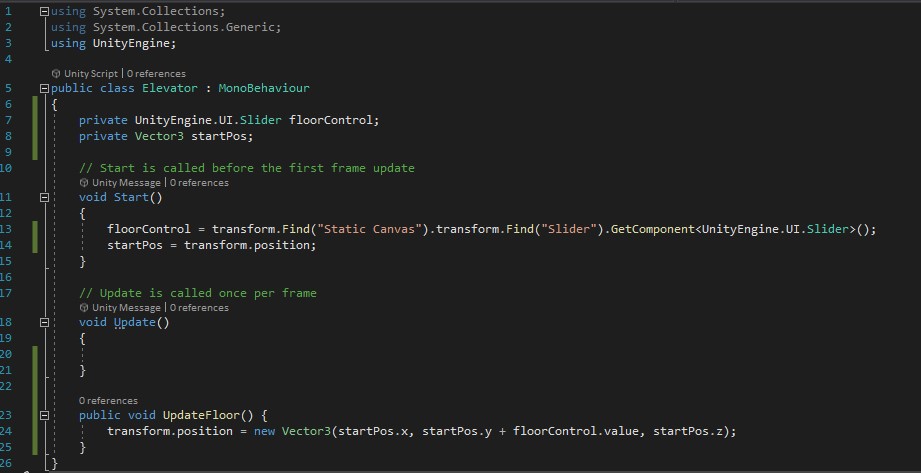
I created a simple block that is tied to a static UI slider which the player can grab and lift to up/down.

Next: body physics for the player.

Right now the VR avatar doesn’t follow any rules of physics so the elevator just passes right through without lifting you up. I found a handy tutorial by BeginnerVR that should help me get things working properly.